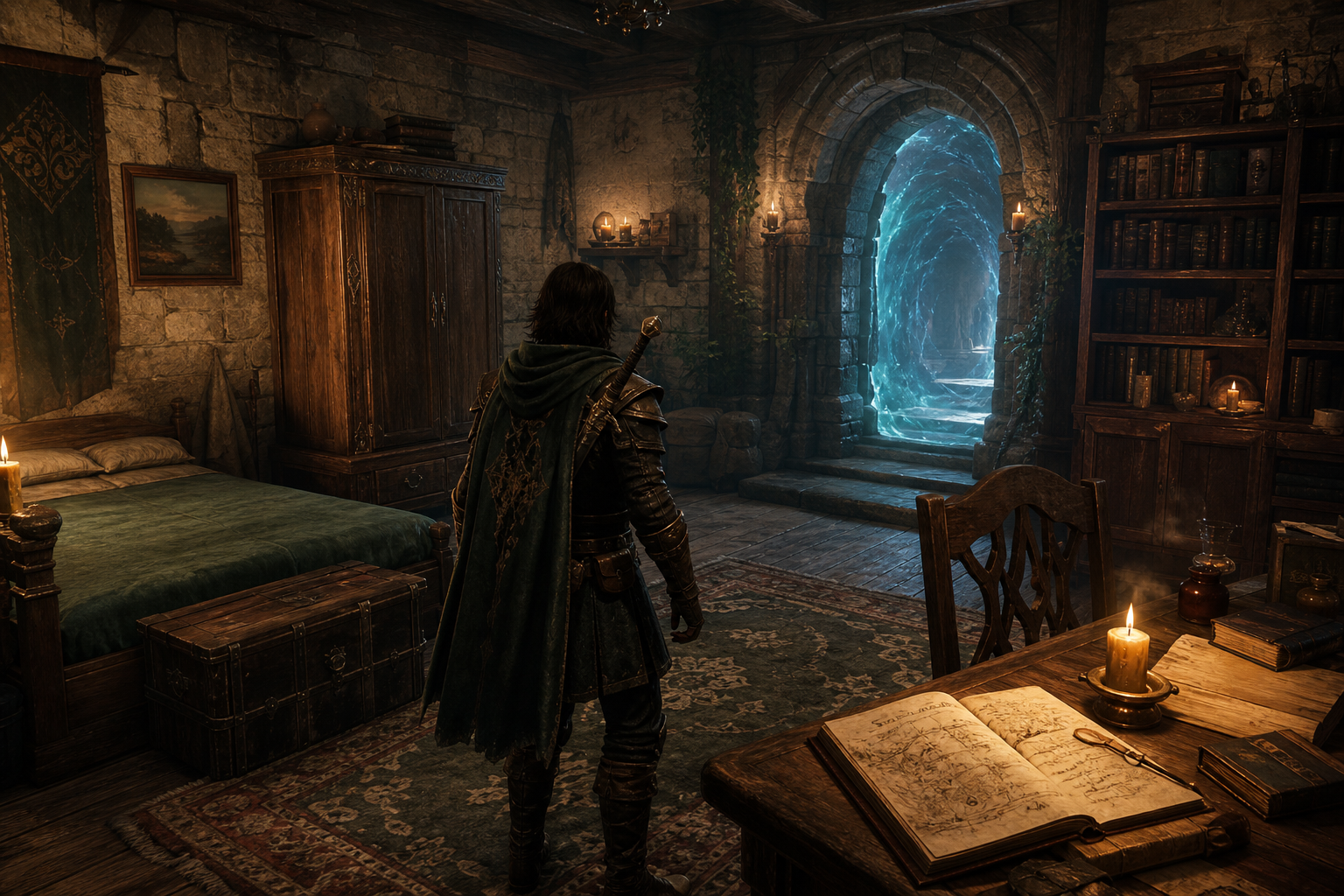
Your character is no longer just a sheet and a portrait.
With DND AI 2.0, you can forge a fully animated 3D avatar from your hero's image — then step into their personal home, talk with companions, decorate the walls, and walk through a portal straight into your next campaign. This is the biggest leap since launch: your adventures now have a place to live between sessions.
Character Forge
From portrait to playable avatar
Turn your character or companion portrait into an animated 3D avatar you can walk around as.
- Open the Forge from your character sheet's 3D Avatar panel
- Crop tightly and erase props for a cleaner model
- Forge takes about 10 minutes — leave anytime; it continues on our servers
- Keep multiple looks in your model library and set the active one
Companion Forge uses the same flow, so your party can join you in 3D.
Your 3D Home
A living space between adventures
Every forged character gets a personal 3D home you can walk around in — connected to the same character sheet you already use. Walk up to something, interact, and the matching part of your sheet opens right there.
- Cupboard — your inventory. New gear or finished item art shows a floating "!" until you check it.
- Journal — your character's story and history. When the story updates, the journal gets an alert.
- Bookcase — spells and abilities. It also reminds you if you still have level-up points to spend, or if new spell and ability art is ready.
- Portal — browse campaigns and start playing as the character you're currently in the home with.
- Model Portal — switch which 3D look you're using, or head back to the Character Forge to make a new one. A "!" appears when a forge finishes or you change looks.
- Picture Frames — hang gallery art and portraits on your walls.
- Ascension Ladder — view emblems and titles you've earned with pokals.
- Rune Wall — browse achievements from your adventures.
Floating "!" markers tip you off when something new showed up on your sheet — loot, spells, story updates, a finished forge, and more — so you don't miss it while you're away.
Living Companions
Your party, waiting at home
Companions from your character sheet can show up in your 3D home as people you can walk up to — same faces, stories, and forged looks from the Companions tab.
How they arrive
- Keep companions on your character sheet under the Companions tab.
- Forge a 3D look for them from their 3D Avatar panel — same Forge as your hero. Until it's ready, they appear as a soft glowing wisp.
- Step into 3D Home. Everyone on your Companions tab joins you there.
- You'll find them gathered in the bedroom area, spaced out so they aren't standing on top of each other.
- If a forge finishes while you're still in the home, the wisp turns into their full animated look automatically — no need to leave and come back.
What you can do with them
Walk up to a companion and interact to open a circle of options around their portrait:
- Command to follow / Stop follow — have them trail you around the home, or let them go.
- Command to stop / Move again — freeze them in place, or let them wander again.
- Talk — chat with them. Your conversations are saved and stay available on the character sheet. They animate while they answer.
- NPC Chats — re-read chats companions have had with each other.
- Actions — ask them to Dance, Sit, Talk, Kneel, or Lie down. Pick the same action again to clear it.
Companions also chat with each other on their own. You can watch those moments play out in the home, then find them later under NPC Chats.
Test Character
The playground
A playground to try your avatar before or between campaigns — walk, run, sprint, jump, try combat and spell moves, and preview poses. Open it from the 3D model viewer on your character sheet.
Connected to the Character Sheet
Your home isn't a separate place — it's another way into the same character you already know.
- Companions on the Companions tab are the same people who appear in your home — portraits, stories, chats, and 3D looks included.
- The Cupboard, Journal, and Bookcase open the same inventory, history, and abilities you use on the sheet. Changes stick either way.
- Forge a companion from their 3D Avatar on the sheet; when it's done, that look is ready the next time you visit home.
- Talks you have — and chats companions have with each other — are remembered on both the sheet and in the home.
- The Portal starts an adventure with the character you're currently playing as in the home.
- Floating "!" markers keep up with your sheet, so new gear, spells, story beats, and finished forges don't get missed.
Bug Fixes
Story, flow & memory
- Stronger story coherence across sessions
- Better character and companion memory — the world remembers who you are and who travels with you
- Smoother adventure flow and quest tracking
- Combat, companion, and gameplay bugfixes for a cleaner table
How to Get Started
- Open your character sheet → 3D Avatar
- Forge your first model in the Character Forge
- On the Companions tab, forge a 3D model for anyone you want living in your home
- Enter 3D Home from the navbar — meet your companions, try Talk / Follow / Actions, and use the Cupboard, Journal, Bookcase, and Portal
- Try Test Character to put your hero through their paces
- Use the Portal when you're ready for the next campaign
Welcome to DND AI 2.0 — your heroes finally have a world of their own.